On-demand · Isolated · Ephemeral

Red Team Your Code.
Before Someone Else Does.

Blue Sentinel brings an offensive security mindset to code review. Upload your application source code and get a prioritized, exploitability-driven security assessment — the way a red team would see it, not the way a linter would.

Multi-engine SAST + SCA Exploit-chain mapping AWS & Azure Marketplace (soon)
bluesentinel › assessment
Critical
7
High
24
Fix Now
12
Findings
54
SeverityFindingLocationCWE
CRITICALSQL InjectionAuthController.php:42CWE-89
HIGHServer-Side Request Forgeryapp.py:29CWE-918
HIGHPrototype Pollution (lodash)package.jsonCWE-1321
MEDIUMWeak Cryptographyapp.py:78CWE-327
See a real assessment, start to finish From upload to the prioritized fix-now list — heatmap, exploit chains, and remediation in under two minutes.
The gap your current tools aren't covering

Thousands of findings. No idea what an attacker hits first.

Your team runs vulnerability scans. You get thousands of findings, sorted by CVSS score, with no clear indication of what an attacker would actually exploit first.

Your annual penetration test covers endpoints and infrastructure. Your source code — where the real logic lives — rarely gets the same scrutiny.

Blue Sentinel fills that gap.

A code-focused security assessment, on demand

Most security testing stops at the perimeter. We go into the code.

Tracing exactly how attacker-controlled input travels through your application to reach dangerous operations.

Static Code Analysis

Identifies vulnerabilities across your application logic — injection flaws, broken authentication, insecure data handling — mapped to CWE and OWASP Top 10.

Software Composition Analysis

Audits every dependency in your stack. Finds known CVEs in the libraries your application trusts, and identifies the shortest path to fixing them.

Exploit Chain Mapping

Doesn't just flag lines — traces complete attack paths from entry point to impact. Shows exactly what a skilled attacker would target first and why.

Adversarial Remediation Planning

Prioritizes fixes by real-world exploitability, not arbitrary severity scores. Tells you what to fix today, what to schedule, and what to architect differently.

security dashboard
Security dashboard — open critical count, total findings across projects, vulnerability distribution, top vulnerable projects, scan activity over 30 days and code hotspots
One view across every project — open criticals, distribution by severity, scan activity, and the files generating the most issues.
Language coverage

15 languages. Six analysis engines on each.

Most tools run one pass and call it analysis. Blue Sentinel runs a lexical scan, an AST walk, a control-flow graph, dataflow, taint tracking and pattern matching over every supported language — then cross-checks the results against Semgrep and CodeQL.

15

Languages analysed end-to-end, from PHP and Python to Solidity, Swift and ABAP.

6

Independent engines per language — lexical, AST, CFG, dataflow, taint and pattern.

5

Dependency ecosystems for composition analysis: npm, PyPI, Maven, Composer and Go.

2

Industry scanners run alongside ours — Semgrep and CodeQL — so findings are corroborated, not asserted.

Every language, every engine

Language Lexical AST CFG Dataflow Taint Pattern
PHP
Python
JavaScript / TypeScript
Java
Go
C / C++
Ruby
Swift
Objective-C
Dart
Solidity
ABAP
Shell
Kotlin
C#

C/C++ additionally runs a dedicated memory-safety engine for buffer, integer and lifetime defects. Kotlin and C# coverage is being extended to the full engine set.

Risk Overview

See your risk — not just a list of findings

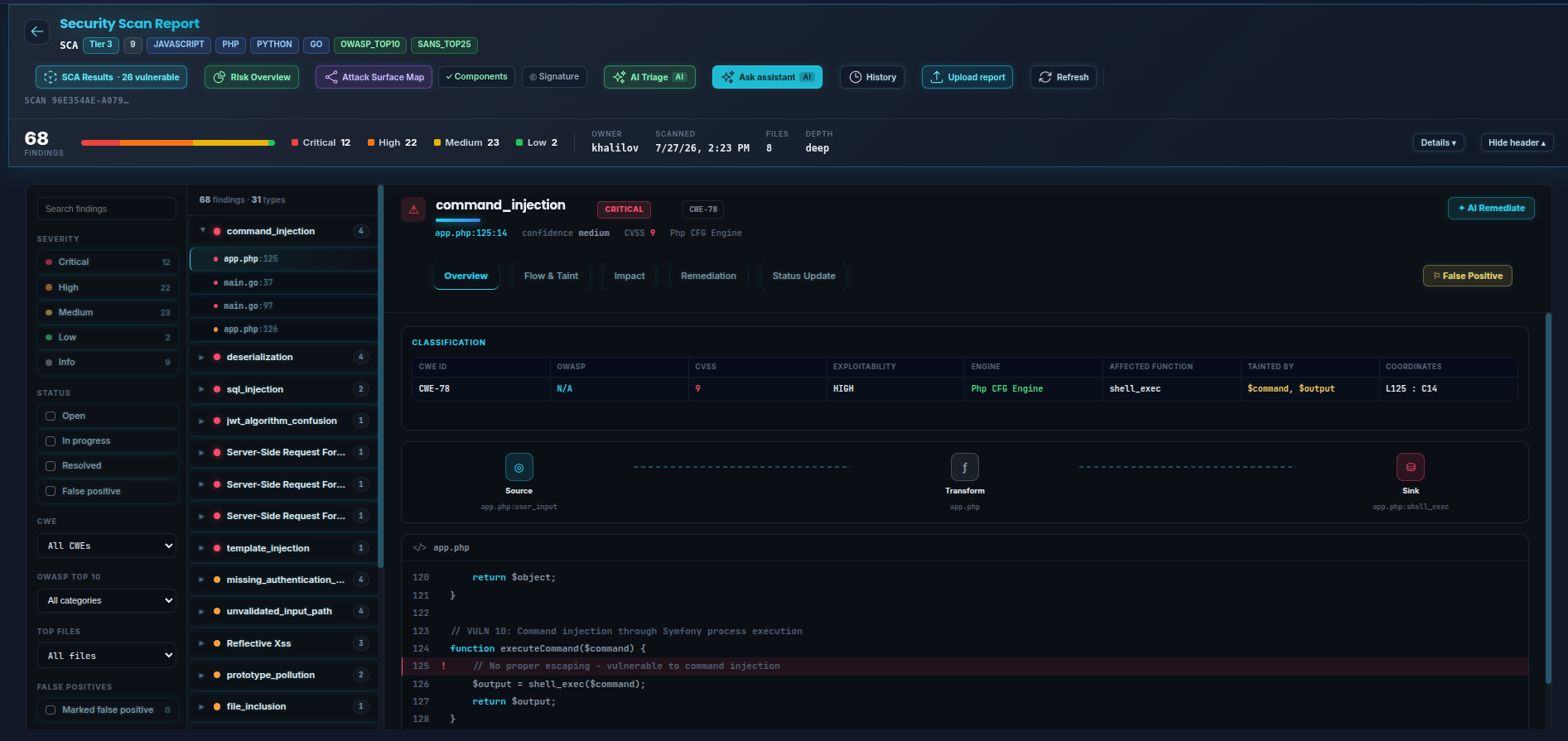
Live captures from a real assessment — 68 findings across PHP, Python, Go, JavaScript and Java.

Every finding, fully classified

Findings are grouped by type and ranked by severity, not dumped in a flat list. Open one and you get the whole picture on a single screen: CWE, OWASP category, CVSS, exploitability, the engine that found it, the affected function, the exact variables carrying the taint, and the vulnerable line highlighted in its own source.

  • Filter by severity, status, CWE, OWASP or file
  • Overview · Flow & Taint · Impact · Remediation per finding
  • Mark false positives · track status to resolved
scan › security report
Security scan report — 68 findings grouped by type, with a critical command injection selected showing its CWE-78 classification, source-to-sink path and the vulnerable line of PHP

Fix the root, not 40 call sites

A treemap of your codebase where each file is sized by lines of code and colored by its worst finding. One big red tile on a shared utility means a single fix eliminates dozens of findings — obvious in a way a sorted list never is.

  • Severity-colored, LOC-sized treemap
  • Consolidate by directory · drill into any file
risk overview › fix location heatmap
Fix Location Heatmap

From "847 findings" to "12 to fix now"

A prioritization matrix plots every finding by exploitability against business impact. The top-right quadrant is your fix-now list. Click any quadrant to see exactly which files and vulnerabilities live there.

  • Exploitability × business-impact quadrants
  • Click a quadrant → its findings
risk overview › prioritization matrix
Risk Prioritization Matrix

"Fix N findings by changing 1 line here"

Blue Sentinel computes the highest-leverage remediation points — the earliest node in a data-flow that, if fixed, eliminates the most downstream findings. It's what a senior security engineer does by hand, done automatically.

  • Ranked, highest-leverage fixes first
  • Suggested fix type per cluster
risk overview › best fix locations
Best Fix Locations

Follow the taint, hop by hop

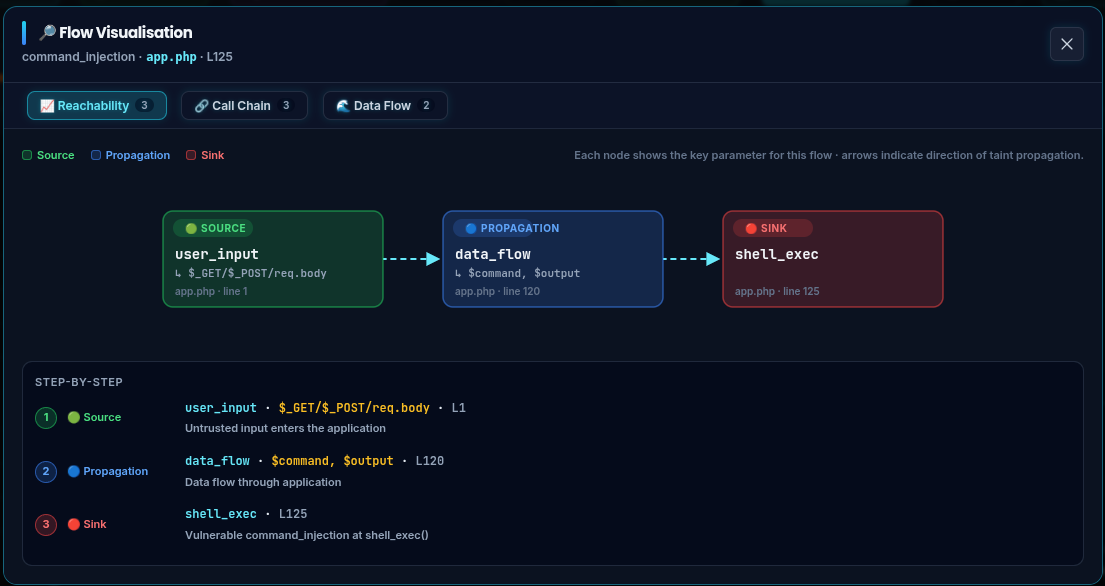
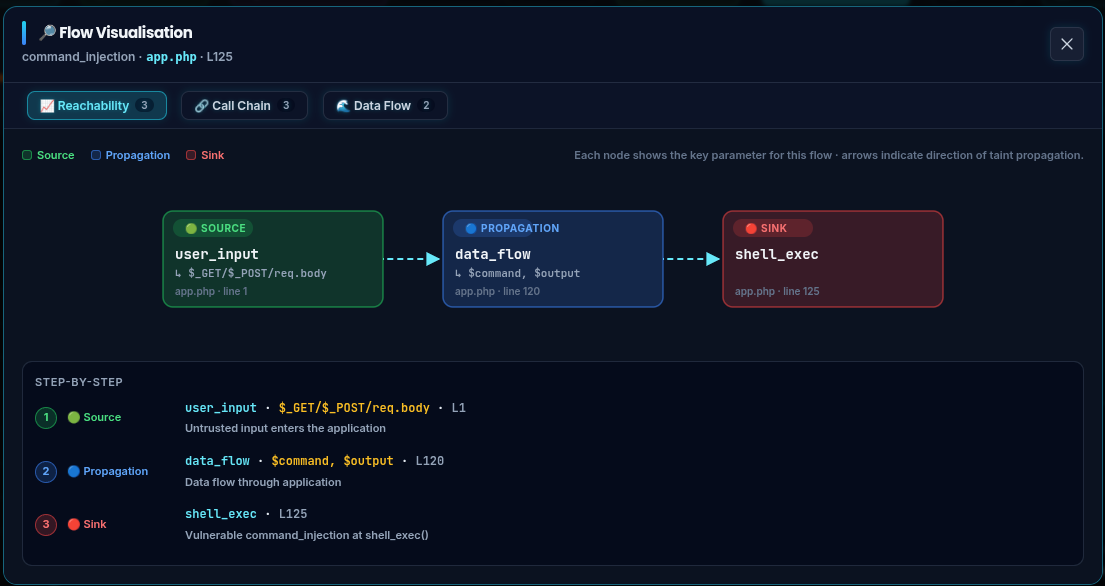
Every finding opens onto a Flow & Taint view: the source that accepts attacker input, the components it passes through, and the sink where it becomes dangerous. Click Visualize flow and the same path is drawn as an animated graph — source, propagation, sink — with the file and line number on every node.

  • Source → transform → sink, per finding
  • Reachability, call chain and data flow views
  • Step-by-step breakdown with file · line
finding › flow & taint
Flow and Taint graph — user_input source through data_flow propagation to a shell_exec sink, with a step-by-step breakdown

Visualize the flow of attack across the whole codebase

The Attack Surface Map folds every taint path in a scan into one interactive graph. Entry points, sinks and sanitizers are marked; nodes are sized by how many findings land on them and colored by worst severity. Sanitized hops are drawn as dashed edges, so a missing sanitizer is visible at a glance.

  • Entry → sink graph, file or function level
  • Ranked top-10 highest-risk locations
  • Drill into any file · export PNG or PDF
scan › attack surface map
Attack Surface Map
Attack Surface Mapcapture the Cytoscape entry→sink graph, not the per-finding flow modal

Every dependency, every CVE, and the version that fixes it

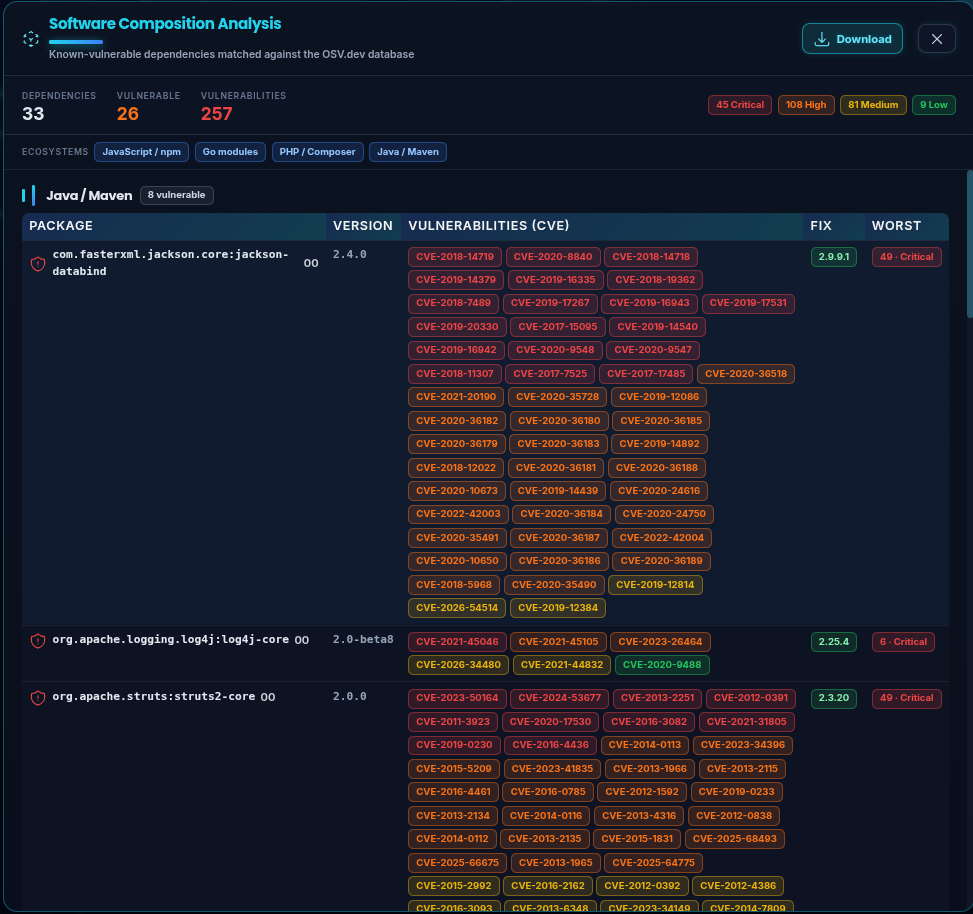
Blue Sentinel reads your manifests across npm, Go modules, Composer, Maven and PyPI, and matches every package against the OSV database. Each vulnerable dependency lists its CVEs and — the part that matters — the lowest version that clears them, so the upgrade is a decision rather than an investigation.

  • Five ecosystems from one upload — no manifest wrangling
  • Matched against OSV.dev · worst-severity per package
  • Reachability analysis — is the vulnerable code actually called?
scan › software composition analysis
Software Composition Analysis — 33 dependencies, 26 vulnerable, 257 vulnerabilities across npm, Go, Composer and Maven, with CVE lists and fix versions per package
dependency graph
Dependency risk graph
Dependency risk graph — CVEs by package & fix version
trend
Trend over time
Trend & regression tracking across scans
owasp radar
OWASP Top 10 radar
OWASP Top 10 coverage vs the previous scan
Reporting

A summary your board reads, over detail your engineers can act on

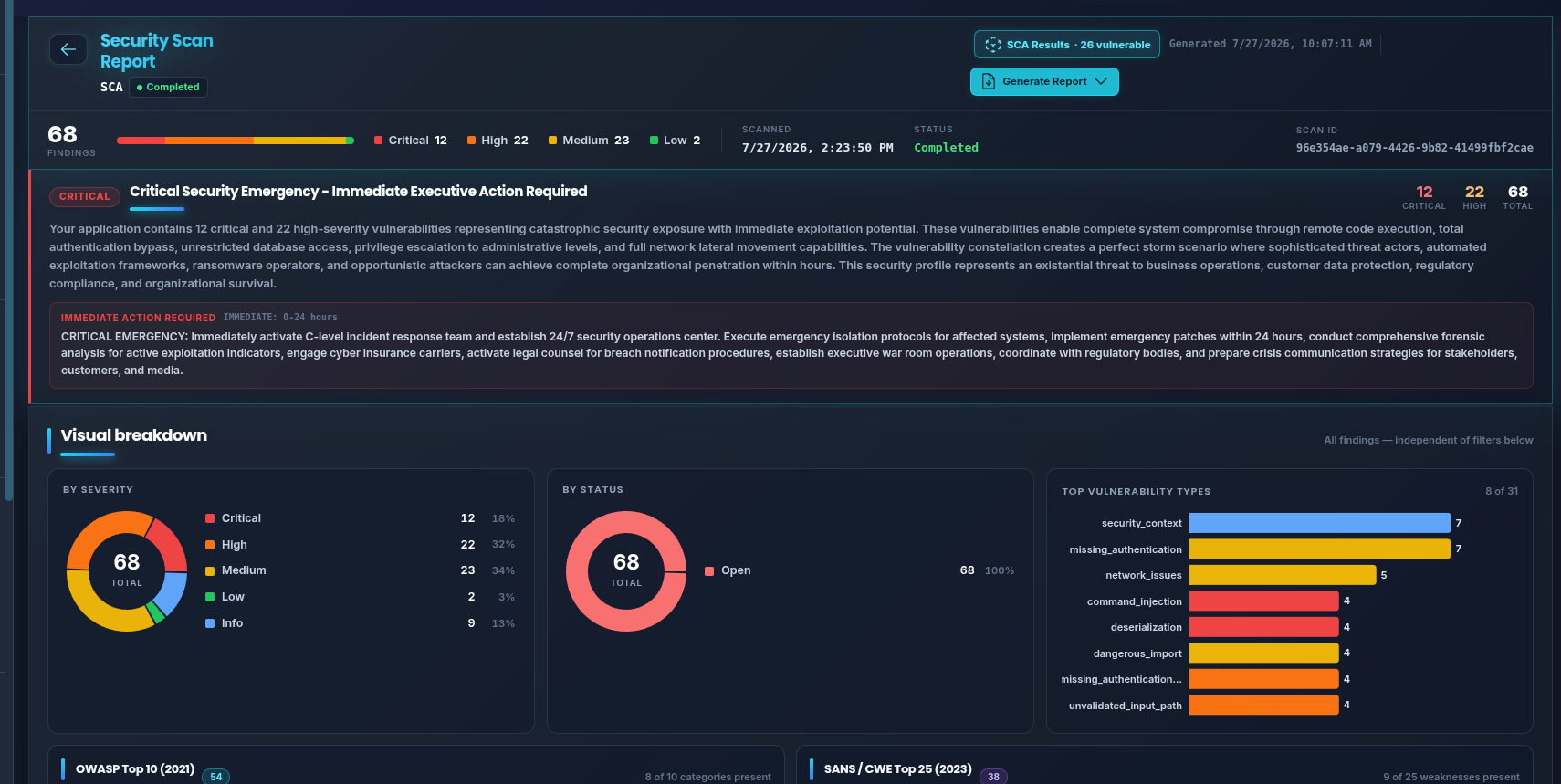
Every scan opens with a written executive assessment — what the findings mean commercially, and what to do in the first 24 hours — followed by the severity, status and vulnerability-type breakdowns, and OWASP Top 10 and SANS/CWE Top 25 coverage. Export the whole thing as PDF, HTML, SARIF, CSV, JSON or XML.

scan › executive summary
Security scan report executive summary — a written critical-risk assessment with immediate actions, severity and status donuts, top vulnerability types, and OWASP Top 10 and SANS CWE Top 25 coverage

Every view exports to CSV, JSON, and PNG — drop it straight into a report.

History & trends

Prove security is improving — scan over scan

A single scan tells you where you stand today. Blue Sentinel keeps every scan in the project and shows the direction of travel, so you can demonstrate progress to an auditor, a board, or a customer's security questionnaire.

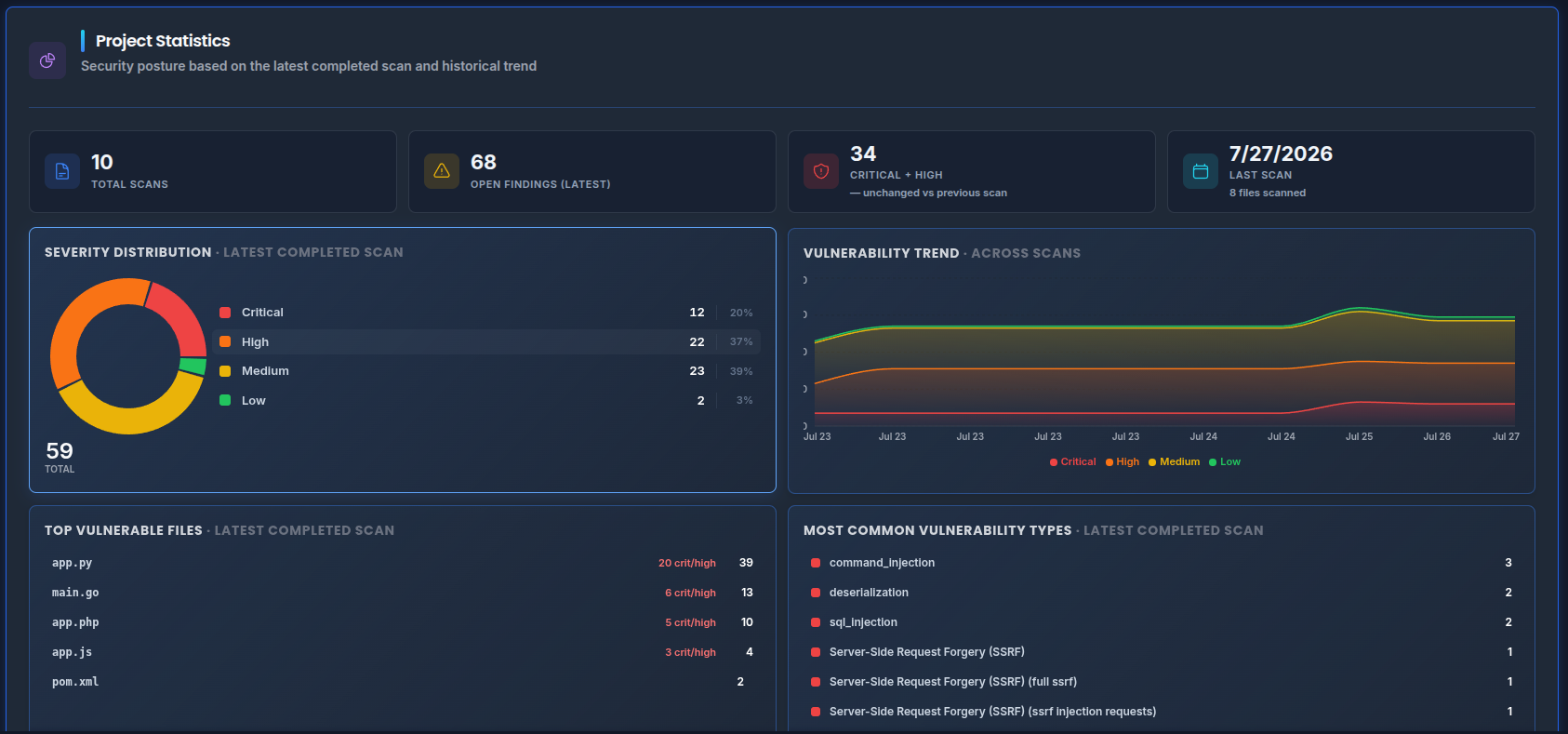
Per-project security statistics

Each project gets its own dashboard: total scans, open findings on the latest scan, and a critical-plus-high count carrying an explicit movement figure against the previous scan — down, up, or unchanged, stated rather than implied. Beneath it, a severity donut for the newest scan and ranked lists of your most vulnerable files and most common vulnerability types.

  • Latest-scan KPIs with movement vs the last scan
  • Top vulnerable files · most common finding types
  • Full scan history with per-severity breakdown
project › statistics
Per-project security statistics — total scans, open findings, critical plus high with movement, severity donut, trend, top vulnerable files and most common vulnerability types

The trend line that matters

A stacked trend chart plots critical, high, medium and low findings across every completed scan in the project. Filter to the last 7, 30 or 90 days, and export the series as CSV, JSON or PNG for your own reporting.

  • Severity trend across the project's scan history
  • 7 / 30 / 90-day ranges · CSV, JSON, PNG export
project › vulnerability trend
Vulnerability trend across scans

Compare any two scans, finding by finding

Select two scans and Blue Sentinel splits the difference into fixed, new and persistent findings, with a risk-score delta and an overall improvement figure. It answers the question every release review asks: did this sprint make us safer, and what did it break?

  • Fixed · new · persistent, broken out by severity
  • Risk-score delta and improvement percentage
project › compare scans
Scan comparison
AI-assisted, not AI-guessed

An analyst in the loop for every finding

Deterministic engines find the issues. A security-tuned AI layer then helps you cut the noise, understand the risk, and ship the fix — grounded in your actual code and taint paths, never hand-waving.

AI Security Assistant

Ask questions about your assessment in plain English — "which findings touch authentication?", "explain this exploit chain". It answers from your scan's real findings, snippets, and data-flow, with sources.

AI Triage & Verification

An adversarial reviewer confirms or refutes each finding — flagging likely false positives (sanitized input, unreachable paths) and confirming the real ones with a rationale and a confidence score. Less noise, more signal.

Per-Finding Remediation

One click turns a finding into a concrete fix: the attack scenario, a patched code snippet, the remediation strategy, and its assumptions — using the finding's taint source, sink, and call chain as context.

Remediation Planning

Roll individual fixes up into a prioritized, sequenced remediation plan for the whole assessment — a developer-ready backlog ordered by real-world risk, exportable into your workflow.

Bring your own model. Point Blue Sentinel at your own AI provider and key — your code and findings go to the model you choose and trust. Every AI call is redacted and audit-logged — you can see exactly what was sent and to whom. AI is opt-in and additive — the assessment stands on its own without it.
AI security assistant and per-finding remediation panel
Reconcile every source of truth

Compare your pentest & scanner reports against the code

Import the reports you already have — Burp Suite, OWASP ZAP, Snyk, and other web-pentest or scanner outputs (XML/JSON) — and overlay them against Blue Sentinel's code-level findings in one reconciled view.

  • Import Burp / ZAP / Snyk & other pentest reports
  • See what your pentest found that the code review didn't — and vice-versa
  • Full imported-report detail — description, parameter, remediation — kept intact
  • One consolidated risk picture across DAST, SAST & SCA

Your annual pentest and your automated scanners each see part of the picture. Blue Sentinel puts them side-by-side with what's actually in the source, so nothing falls through the gap between tools.

External-report comparison view — pentest and scanner reports reconciled against the code
Simple process. Serious depth.

How it works

01

Upload

Upload your application source code directly to Blue Sentinel's secure, isolated assessment environment. Supports all major languages. No repository access required. No agents to install.

02

Assess

Blue Sentinel runs a multi-engine analysis — combining static analysis, composition auditing, and taint-path tracing — to build a complete picture of your application's attack surface from the inside out.

03

Act

Receive a detailed, prioritized report with full exploit-chain visualizations, a remediation backlog sorted by real-world risk, and guidance your team can act on immediately. No noise. No ambiguity.

Who this is for

Built for teams who take security seriously

Security Teams

Conduct a thorough code review of your critical applications without waiting for a consultant's availability or a pentest window. Validate your security posture before external engagements — so your red team finds what matters, not the obvious issues.

Engineering Leaders

Understand the real security exposure in your most important applications. Get a board-ready risk summary alongside a developer-ready remediation backlog — in the same report.

Developers

See exactly where vulnerable code is, why it matters, and how to fix it. Not hundreds of rule-match warnings — a focused list of real issues with real remediation guidance.

MSSPs & Security Consultants

White-label grade reporting. Run code security assessments for clients on demand. Deliver findings that look and read like a professional engagement output, not a raw tool dump.

On-demand · Isolated · Ephemeral

Your code never touches shared infrastructure

Every Blue Sentinel assessment runs in its own dedicated cloud environment — created for your scan, destroyed when it's done. Coming soon to the AWS and Azure marketplaces for one-click private deployment.

Your code never touches shared infrastructure. Your findings never share a database with another company. When the assessment is complete, the environment is gone. Permanently.

This is how government contractors, financial institutions, and security-conscious engineering teams get serious code security assessments without compromising their most sensitive IP.

AWS Coming soon toAWS Marketplace AZ Coming soon toAzure Marketplace

See the deployment architecture →

Coming soon Marketplace listings in review Blue Sentinel is being listed on the AWS and Azure Marketplaces for one-click private deployment into your own cloud account. Get in touch if you would like early access.
Differentiation

Not a scanner. A security assessment.

Blue Sentinel is not designed to run on every commit. It is designed for the moments that matter — before a product launch, before a compliance audit, before an external red team engagement, after a significant feature release.

Think of it as the code-security equivalent of bringing in a specialist: systematic, adversarial, and focused on what actually puts your business at risk.

Your most critical applications deserve more than a ruleset scan.

Start a Blue Sentinel assessment today.

Built by offensive security researchers. Trusted by teams who can't afford to find out the hard way.

Common questions

Frequently asked

What is SAST?

Static Application Security Testing analyses source code without running it, to find security flaws before they reach production. Blue Sentinel goes further than a rule match: it traces how untrusted input actually reaches a dangerous operation, so the findings are ranked by whether they are genuinely exploitable.

How much does Blue Sentinel cost?

Assessments are $600 each, with a minimum purchase of 5 ($3,000). Ten assessments are $540 each ($5,400). There is no subscription and no per-developer licence, and purchased assessments do not expire. Full detail is on the pricing page.

What languages does Blue Sentinel support?

Fifteen languages, including PHP, Python, JavaScript and TypeScript, Java, Go, C and C++, C#, Ruby, Swift, Kotlin, Dart, Solidity, ABAP and shell. Every language is covered at the same price.

Is Blue Sentinel open source?

No. Blue Sentinel is a commercial product built on a proprietary multi-engine analysis pipeline.

Can I run Blue Sentinel on my own infrastructure?

Yes. Blue Sentinel can be deployed inside your own network, or fully air-gapped with no outbound connectivity at all, so source code never leaves your infrastructure. One-click deployment through the AWS and Azure marketplaces is coming.

What do I get from a single assessment?

A full static analysis and software composition audit, taint-path tracing with exploit-chain mapping, an AI-assisted remediation plan, and a backlog prioritized by real-world exploitability rather than raw severity.